
Personal touches
How to include your pet in your wedding newspaper.
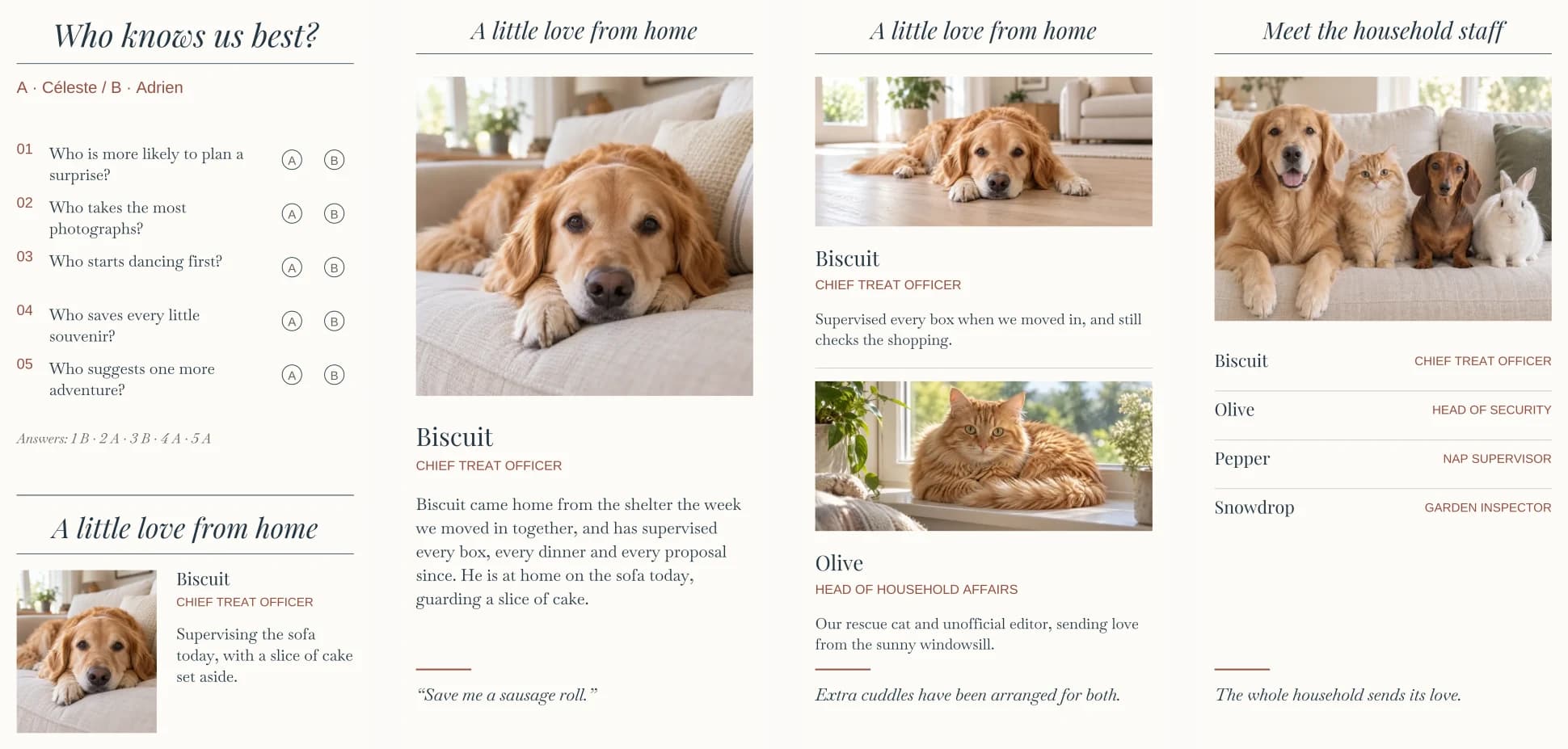
Most venues can’t fit the dog on the guest list, but a newspaper can. Introduce your pets with their names and a little about them; photographs and playful job titles are optional. Here are wording ideas, photo tips and the choice between a shared spotlight for 1–3 pets and a whole column for 1–6.
How do you include a pet in a wedding newspaper?
In Vowfold’s Chronicle edition, keep the couple game with a small spotlight for 1–3 pets sharing one optional photograph, or replace the game with a whole column for 1–6 pets. The whole column offers individual introductions and optional portraits for 1–3, or names and a shared introduction with one optional group photograph for 4–6. Titles and a separate playful quote are optional where offered.
Why give your pet a spot
Pets are part of the story: the dog who came on every first walk, the cat who sat on the seating plan. Most of them will spend the wedding at home, so the newspaper is where guests meet them. It is also one of the sections guests point out to each other, which makes it a good place for a lighter note between the order of the day and the thank-you.
A small spotlight or a whole column
In Vowfold’s Chronicle edition, these are two arrangements for the right column of page four. Choose the space first, then the number of pets. The puzzle and thank-you stay on the page.
- A small spotlight sits beneath the couple game and fits 1–3 pets. Add a name and short note for each. They share one optional photograph; a single pet can also have an optional title. Choosing 1, 2 or 3 changes the number of entries; they still share one photograph.
- A whole column replaces the couple game and fits 1–6 pets. For 1–3, each pet has a name, optional title, individual note and optional photograph. For 4–6, their names and optional titles appear together with one optional group photograph and an optional shared introduction. A separate playful quote is optional throughout the whole-column arrangement.
Give them a job title
A playful job title gives guests a glimpse of their character. In Vowfold, titles are optional: add one for a single pet in the small spotlight, or for each pet in the whole column. You can write your own, use the editor’s title ideas, or borrow one of these.
Dogs
- Chief Treat Officer
- Head of Security
- Ring Bearer in Training
- Official Greeter
- Director of Fetch
- Sofa Quality Control
- Head of Welcome Committee
- Senior Walk Coordinator
- Crumb Patrol
Cats
- Head of Household Affairs
- Nap Supervisor
- Windowsill Correspondent
- Keyboard Inspector
- Chief Box Tester
- Director of Disapproval
- Night Shift Manager
Rabbits, birds and small pets
- Garden Inspector
- Chief Lettuce Taster
- Morning Alarm
- Head of Tunnelling
- Department of Chirps
- Tank Manager
Honorary wedding roles
- Best Dog
- Ring Bearer (Honorary)
- Maid of Honour (Feline)
- Flower Dog
- Guest of Honour, Absent
Writing about them
A sentence or two is enough for a small spotlight. A single pet in the whole column has more room for a longer story; two or three need shorter individual notes, and 4–6 share one introduction. A simple order works for almost any pet:
- How they arrived: the shelter, the litter, the day they turned up in the garden.
- Their part in your story: the move, the proposal, the habit everyone knows.
- Where they are today: at home on the sofa, with a sitter, or here in a bow tie.
Three examples, in three tones:
Warm. Olive came home two winters ago and chose Céleste’s lap. Today our windowsill correspondent is keeping the sofa warm.
Funny. Biscuit supervises every meal and steals the odd sock. Today he is with his sitter. Please save him a sausage roll.
Short. Pepper guards the doorbell, keeps us walking and naps on every coat.
Keep it to things guests will understand, and use the remaining-character count in the editor to see how much room you have. Check the live page preview when several pets share the small spotlight. A private nickname or an in-joke works better in a card than on a page everyone reads.
A line in their own words
The whole-column arrangement has a separate, optional “A playful quote from your pet” field, or “pets” for a group. This is a line in their imagined voice, up to 70 characters, printed in italics. The shared introduction for 4–6 pets is written by you, about them; it is a different field. The small spotlight has no separate quote field, but a short playful line can be part of its note. Write one of your own, or use one of these:
- “Save me some cake.”
- “I was the best man all along.”
- “Back by bedtime, please.”
- “Extra treats have been negotiated.”
- “Woof. (It means congratulations.)”
- “Please bring home leftovers.”
- “I approve of this union.”
- “Someone tell them I’m the real ring bearer.”
- “Ten out of ten. Would wag again.”
- “I’ll be on the sofa if you need me.”
- “I did not chew this newspaper. Yet.”
- “Sending love and a little fur.”
- “Waiting by the door.”
- “Meow. We’ll translate later.”
- “Who’s a good wedding? You are.”
Photographing your pet
Photographs are optional in both arrangements. If you add one, a clear picture of their face prints better than a busy scene, especially on newsprint. A small spotlight uses one shared photograph. The whole column uses individual photographs for 1–3 pets, or one group photograph for 4–6.
- Get down to their eye level, on the floor or the sofa beside them.
- Use window light instead of flash, which flattens fur and catches eyes.
- Choose a plain background: a sofa, a blanket, a wooden floor.
- Hold a treat or toy just above the lens and take a burst; one frame will have both eyes open.
- Check the crop. The whole column adapts to wide, square and upright photographs. The small spotlight has a compact frame, so a group needs all their faces close together. Use the photo-positioning tool and check that ears and noses stay inside the frame in the live preview.
- Use your own photo, not a stock picture of the same breed. Guests notice.
Dark coats lose detail on newsprint. If your pet is black or dark brown, brighten the photograph slightly before you add it, or choose one taken in good daylight.
More than one pet
For two or three pets, choose whether to keep the couple game. A small spotlight combines their names and notes beside one optional shared photograph. The whole column gives each their own introduction and optional photograph; three pets read like a staff directory. From four, use the whole column: up to six names and optional titles sit with an optional shared introduction and one optional group photograph.
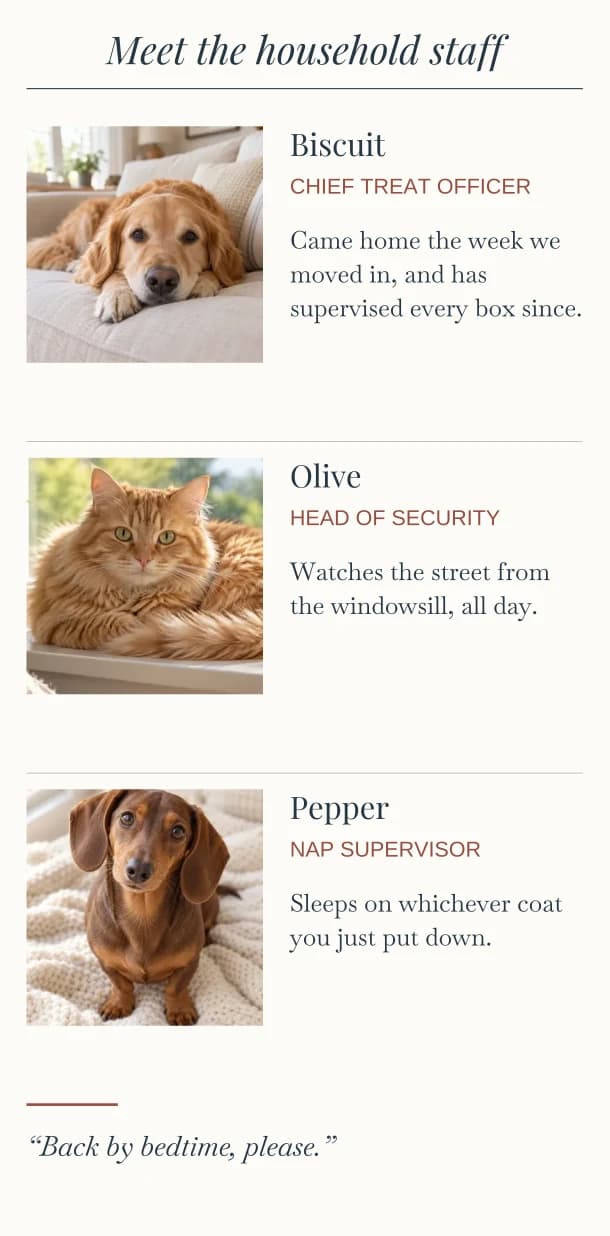
If you want a group photograph, put the calmest animal down first, have someone behind you with treats, and take far more pictures than you think you need. If getting everyone together is impractical, leave the photograph off and introduce them with words.
Remembering a pet who has died
If a much-loved pet is not here to see the day, a sentence can include them without changing the mood of the page. Keep it short and specific, and place it near the people you are remembering, rather than in the middle of the games.
In loving memory of Rufus, who taught us both to take the long way round.
For Daisy, who was there for every chapter but this one.
If your pet is at the wedding
A dog walking down the aisle belongs in the program as well as the spotlight. List them with the wedding party, by role, such as Ring bearer · Biscuit (very good boy), and give them a handler who is not in the ceremony. Our wedding newspaper program guide covers how to list everyone else.
How to add your pets in Vowfold
- Open page four, “To your people”, in the Chronicle edition. Find the “Personal feature” choices above the right-column editors.
- Choose the arrangement. “Couple game + pet spotlight” keeps the game with a small pet feature below it. “Pets in the whole column” gives the pets that column in place of the game.
- Choose how many pets. In the small spotlight, “1 pet”, “2 pets” and “3 pets” reveal that many entries for names and notes. Its example is folded under “See an example”. In the whole column, choose 1, 2, 3 or “4+ pets”; for a group, then choose 4, 5 or 6.
- Add your own details and optional photos. Write each pet’s name, then the individual notes or shared introduction shown for your choice. Add titles and a playful quote where those fields are offered. Check your own content in the live newspaper preview.
You can switch arrangements or try another number without losing saved pet details or photographs. Choosing “Couple game only” removes the pet feature from the page while keeping its draft. To change the game itself, open its editor and choose “Who knows us best?” or “Who said it?”. See the four-page design and its choices.
Questions about pets
Can I include a pet who isn’t coming to the wedding?
Yes. Most pets spend the day at home, and the newspaper is how guests meet them. Say where they are today; it makes a nice last line.
How many pets can I include?
In the Chronicle edition, the small spotlight fits 1–3 pets with one optional shared photograph. The whole column fits 1–6: individual introductions and optional portraits for 1–3, then names, optional titles and a shared introduction with one optional group photograph for 4–6.
What if I don’t have a good photo of them?
Leave the photograph off: their names and your words can introduce them on their own. If you want a picture, take one by a window at their eye level. A clear phone photograph is a better choice than a blurry favourite; check the crop in the preview.
Is a pet section too silly for a formal wedding?
Not if it is short. A warm two-line introduction and a modest title sit comfortably in a formal paper; keep the jokes for a relaxed one.